

Why That Upwork Job Cost 14 Connects an Hour Ago and 18 Now?
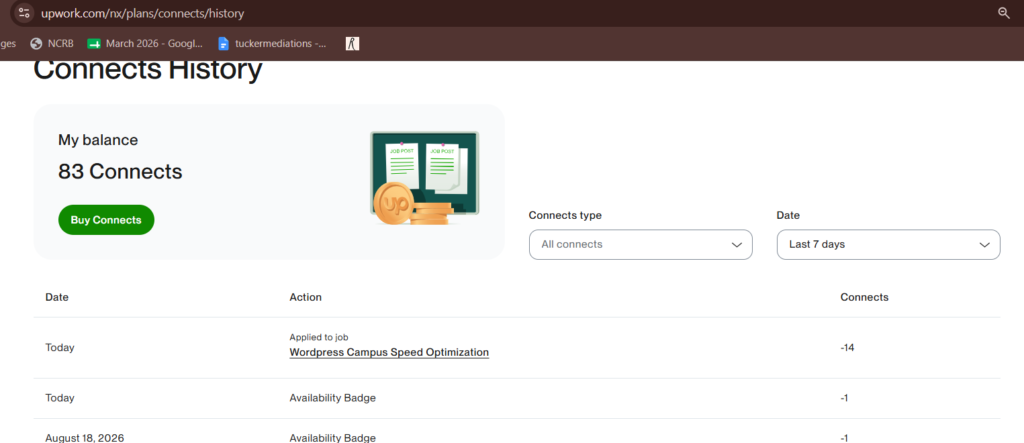
If you have been bidding on Upwork recently, you might have experienced a confusing scenario: you see an attractive job post, check the requirements, and note that applying costs 14 Connects. A couple of hours later—after refreshing the page or seeing more applicants jump into the queue—the exact same job listing asks for 18, 20, or even more Connects.
Upwork uses an algorithmic dynamic pricing system for Connects. The number of tokens required to send a proposal is no longer static; it adjusts dynamically in real time based on demand, market value, and competition.
How Upwork’s Dynamic Connect Algorithm Works
Instead of assigning a flat Connect fee across broad categories, Upwork’s algorithm evaluates real-time data points to calculate the application cost:
- Application Velocity & Proposal Volume: As a job begins collecting proposals (moving from "less than 5" to "20 to 50"), the system automatically inflates the Connect cost to disincentivize proposal spam and slow down submissions.
- Client Quality & Hire Rate: Listings from clients with verified payment methods, extensive spending histories, and high hire rates (e.g., 100% hire rate) are classified as premium opportunities. The platform scales the entry fee upward because the probability of contract conversion is high.
- Budget & Scope Signals: Higher hourly ceilings or large fixed-price project values trigger higher baseline Connect requirements compared to quick, micro-budget tasks.
The Practical Impact on Freelancers
Dynamic pricing creates a clear economic divide between early and late bidders:
- The Early-Bird Discount: Freelancers who spot relevant listings within the first 30–60 minutes can apply at the lower baseline rate (e.g., 14 Connects) before algorithmic price hikes trigger.
- Locked-In Costs: Once your proposal is submitted, your spent Connects are locked in at the rate you paid. Even if the job later surges to 18 or 24 Connects for new applicants, you are never back-charged for the difference.
- Higher Barrier for Crowded Posts: For late applicants, paying an elevated Connect fee on a post that already has 30+ competitors makes calculating Customer Acquisition Cost (CAC) and proposal ROI essential.
How to Adapt Your Proposal Strategy
Navigating dynamic pricing requires shifting from high-volume bidding to precise timing and strict filtering:
- Filter by Job Freshness: Prioritize applying to high-match jobs posted within the last 1–2 hours to take advantage of lower Connect requirements and smaller applicant pools.
- Evaluate the ROI Before Late-Bidding: If a job has surged in Connect cost and already holds 20+ proposals, ensure your portfolio and specialization align tightly before committing the extra tokens.
- Focus on Client Hire Rates: Treat higher Connect costs as an investment only when the client has a proven history of closing contracts rather than letting listings expire.
Dynamic Connect pricing makes timing and client vetting just as important as the proposal pitch itself. By understanding what drives Connect fluctuations, you can preserve your balance and spend tokens where conversion odds are highest.
About us and this blog
We are a digital marketing company with a focus on helping our customers achieve great results across several key areas.
Request a free quote
We offer professional SEO services that help websites increase their organic search score drastically in order to compete for the highest rankings even when it comes to highly competitive keywords.
Subscribe to our newsletter!
More from our blog
See all posts






Recent Posts
- Demystifying Dynamic Connect Pricing by Upwork in 2026 August 19, 2026
- How can i improve my website's SEO to attract more customers? April 2, 2024
- Is Search Engine Submission Necessary? April 17, 2014